
Your team is spending almost two full workdays a week on tasks a computer could finish in minutes. That’s not a guess — it’s the finding at the heart of Zapier’s 2024 State of Business Automation research, which put employee time savings from automation at an average of 11.5 hours per week. By 2026, that gap between businesses that automate and businesses that don’t has become the defining competitive edge in small business.
This pillar guide explains what AI driven automation actually is, what it delivers, what it costs, and exactly how to start. You’ll get real 2025-2026 data from the U.S. Census Bureau, QuickBooks, Goldman Sachs, and Forrester — plus a step-by-step path that works for a five-person team, not just an enterprise.
Key Takeaways
- 77% of U.S. small businesses now use AI regularly, up from 48% in July 2024 (Intuit QuickBooks, 2026 AI Impact Report).
- Employees reclaim 11.5 hours per week through automation; owners reclaim a median of 5 (Zapier, 2024).
- Forrester’s Total Economic Impact studies put 3-year ROI for workflow automation at 248-260%, with payback in under six months.
- Only 14% of small businesses say AI is fully embedded in their operations (Goldman Sachs, 2026).
- AI driven automation is a process, not a purchase — start with one high-volume workflow and expand.
In this article
What Is AI Driven Automation?
AI driven automation is the use of artificial intelligence to complete business tasks and processes without a human performing every step. It combines software that runs on rules (if this happens, do that) with AI that understands context, language, and patterns — so the system decides how to act, not just when.
It’s a category, not a single tool. In practice, it spans four layers:
- Workflow automation — scheduled, rule-based flows like “when a form is submitted, log it in the CRM and email the owner.”
- AI content and document processing — reading invoices, contracts, and emails, then extracting, summarizing, and filing them.
- AI agents and assistants — systems that answer customer questions, qualify leads, and draft responses using natural language.
- Process optimization — using AI to spot bottlenecks and recommend where automation will pay off first.
A common misconception: AI driven automation replaces people. The data says otherwise. In the Goldman Sachs 10,000 Small Businesses Voices survey of 1,256 owners (March 2026), 87% of small businesses using AI say it augments rather than replaces employees. The job it removes is the repetitive one — the data entry, the follow-up email, the status update — and that’s exactly the work employees don’t want anyway.
Why Does AI Driven Automation Matter in 2026?
AI driven automation matters in 2026 because the data now shows two separate small business economies forming — one that automates and one that doesn’t. The divide is measurable, and it’s widening quarter over quarter.
Yet the Census Bureau tells a sharper story. The U.S. Census Bureau’s Business Trends and Outlook Survey (December 2025 to May 2026) puts overall AI usage at just 17-20% of all firms, with less than 20% of businesses with four or fewer employees using AI at all. The message: the tool is accessible, but most micro-businesses still haven’t wired it into daily work.
That’s exactly where the money is. Businesses already using AI aren’t waiting for proof. The Pax8 SMB AI Pulse survey of 402 U.S. small business leaders (Q2 2026) found 61% actively using AI tools and another 29% experimenting — and 68% of active users are confident AI is delivering measurable value. Meanwhile, only 14% of small businesses say AI is fully embedded in core operations (Goldman Sachs, 2026). The businesses that close that gap are the ones pulling ahead.
Here’s an observation most AI coverage misses: the two surveys aren’t contradicting each other — they’re measuring two different things. QuickBooks counts casual use (drafting an email in ChatGPT counts). Census counts operational adoption (AI wired into how the business actually runs). The gap between 77% and 17% is the real number to watch, because that’s the distance between “we tried AI” and “we run on AI.” AI driven automation is what closes that gap.
What Can AI Driven Automation Actually Do?
AI driven automation wins on the same handful of workflows in almost every small business. It’s not exotic. It’s the daily work you can describe in one sentence — and that’s precisely why it’s automatable.
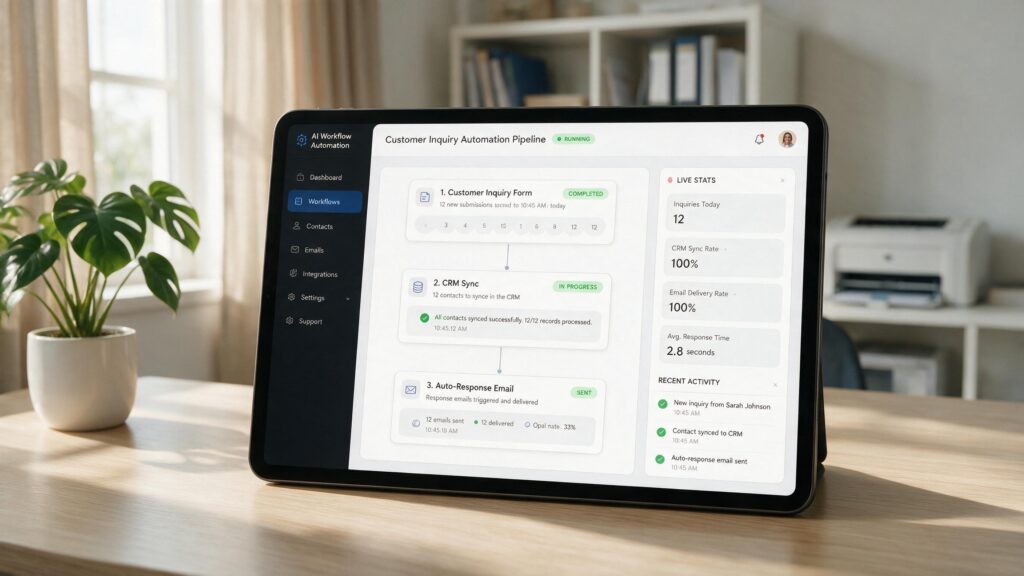
The Business.com 2026 Small Business AI Outlook Report, a survey of 1,009 workers at U.S. companies under 250 employees, found the average worker saves 5.6 hours per week using AI — with managers saving 7.2 hours and individual contributors 3.4. Apply that to a ten-person team and you’ve recovered a full-time employee’s week, every week.
The highest-ROI use cases follow a pattern. They’re high-volume, they follow consistent rules, and they feed on structured input. The ones that show up again and again in our work at Web Works LLC:
- Lead intake and follow-up. Every inquiry gets logged, qualified, routed, and answered within seconds — day or night. No lead slips through because someone was at lunch.
- Invoicing and accounts receivable. Invoices generate from completed work, payment reminders send automatically, and overdue accounts get escalated. The QuickBooks 2026 AI Impact Report found accounting automation alone saves the average small business about $12,400 a year in reduced bookkeeping hours and fewer errors.
- Customer service. AI agents answer the common questions instantly and hand complex cases to a human with full context. Businesses using AI for customer service typically see payback in 3-4 months.
- Scheduling and reminders. Appointments book, confirm, and reschedule without phone tag.
- Document processing. Contracts, invoices, and forms get read, summarized, and filed instead of re-typed.
Here’s the honest caveat: automation only works when the underlying process is already consistent. If your team handles the same task five different ways, you’ll automate chaos. The fix isn’t more software — it’s standardizing the workflow first.
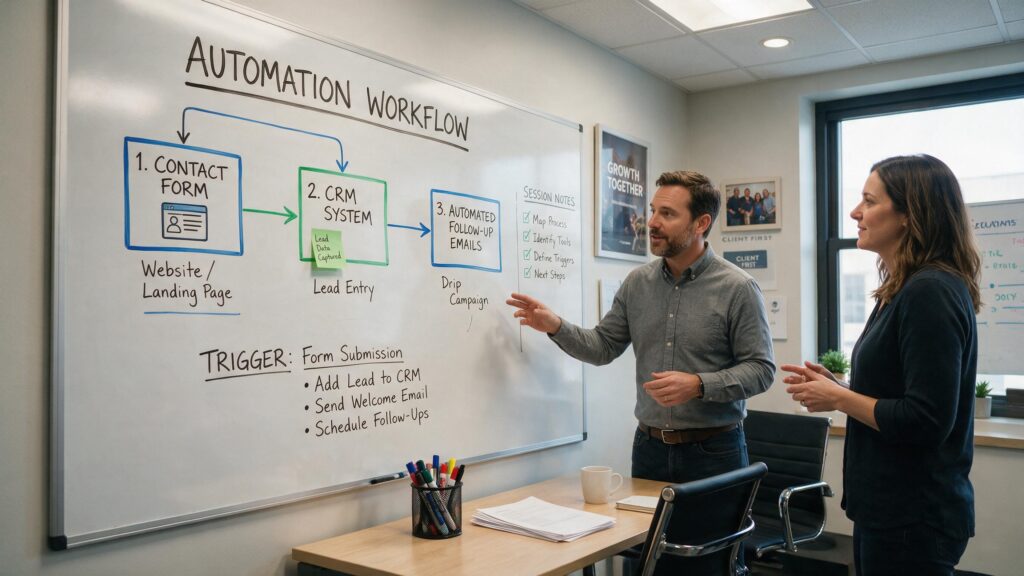
When we build automation for a small business at Web Works LLC, we start by mapping one workflow end to end on paper. Owners are usually surprised how much of their day is a chain of tiny handoffs — a lead lands in email, gets copied into a spreadsheet, gets a manual follow-up, gets logged in a CRM. Each step feels small. Together they eat hours. Automating just that chain — intake to first follow-up — is the single highest-impact project we run, and it’s the one owners say they should have done first.
What ROI Can You Expect From AI Driven Automation?
AI driven automation doesn’t just save time; it pays back its own cost, usually within months. The independent economics come from Forrester’s Total Economic Impact (TEI) studies, which use rigorous multi-year modeling rather than self-reported cheerleading.
In 2024, Forrester’s TEI of Microsoft Power Automate found 248% ROI over three years with payback in under six months. A separate Forrester TEI of Pipefy, published December 2024, found 260% ROI over three years, also with payback under six months, plus 40% time savings on automated processes. On the revenue side, Salesforce’s SMB Trends data (2025) found dashboard and reporting automation delivered a median 340% ROI in year one for small businesses, with an average payback of 2.3 months.
Those numbers make sense once you do the arithmetic. The Zapier 2024 State of Business Automation research found employees save an average of 11.5 hours per week through automation — that’s nearly a third of a 40-hour work week. At a modest $25/hour blended cost, that’s roughly $287 a week per employee, or about $15,000 a year, in recovered capacity. Scale that across a team and the question stops being “can we afford automation?” and starts being “can we afford to keep the manual version?”
The honest side of ROI: not every workflow pays. Low-volume tasks that happen twice a month aren’t worth the setup time. The Pareto rule holds — 80% of the value comes from a handful of high-volume processes. Pick those first, and ROI takes care of itself.
How Do You Implement AI Driven Automation Step by Step?
Implementing AI driven automation is a five-step process, and it matters far more than any tool choice. Most failed automation projects fail before the software is even picked — because nobody defined what “done” looks like.
Step 1: Find the workflow that eats the most time. Ask your team one question: what task do you do every single day that you wish happened automatically? The answer is almost always lead follow-up, invoicing, scheduling, or data entry. That’s your starting point.
Step 2: Document the process exactly as it runs today. Write the steps down. Include every decision — “if a lead mentions budget, tag them urgent.” This document is your automation spec. If you can’t write it in one page, the process needs simplifying before it can be automated.
Step 3: Pick the right level of automation. Not everything needs a full build. For a simple, linear flow, a no-code platform like Zapier or Make handles it. For work that involves judgment — reading, responding, summarizing — you want an AI layer on top. For anything touching your books or customer records, you want a professional who knows where the compliance traps are.
Step 4: Start small, measure hard. Automate one workflow. Track the before and after: hours spent, error rate, response time. The Business.com 2026 report notes that 64% of SMBs plan to launch AI training programs — because the businesses that train their people get roughly 2.3x the productivity lift of those that don’t. Build the training into the rollout, not as an afterthought.
Step 5: Expand one workflow at a time. Once the first automation is stable and measured, move to the next. Businesses that treat automation as an ongoing system, not a one-time project, are the ones still seeing ROI a year later. The Pax8 Q2 2026 Pulse found 29% of AI-using SMBs accelerated their technology investment during economic pressure, compared to 9% of non-users — the compounding advantage of steady, deliberate expansion.
Common Mistakes Businesses Make With AI Driven Automation
Most small businesses that “tried automation and it didn’t work” hit one of four predictable traps. Naming them saves you the tuition.
Mistake 1: Automating a broken process. If the current process is a mess, automation just makes the mess faster. Fix the workflow, then automate it. This is the single most common failure we see in our work at Web Works LLC, and it’s almost always avoidable with one hour of upfront planning.
Mistake 2: Buying tools before defining outcomes. Teams sign up for three platforms, connect nothing, and declare automation overhyped. The tool is the last decision, not the first. Start with the outcome — “no lead waits more than five minutes for a response” — and work backward to the tool.
Mistake 3: Automating everything at once. A 12-workflow rollout in week one creates chaos nobody can debug. The Business.com 2026 research found average workers save 3.4 hours a week, while managers save 7.2 — the people who understand the process get the biggest gains. Give them room to iterate on one workflow at a time.
Mistake 4: Skipping oversight. An automation that sends the wrong invoice to the wrong client is worse than no automation. Every high-value workflow needs a human checkpoint — an approval step, a review queue, a “pause if confidence is low” rule. Goldman Sachs’ 2026 survey found only 14% of small businesses have AI fully embedded in operations; the ones who get there do it with oversight, not blind trust.
A contrarian take, grounded in the data: the biggest automation risk isn’t machines taking jobs — it’s machines quietly taking over bad habits. In the QuickBooks 2026 AI Impact Report, businesses using AI were more likely to report increased hiring (17%) than reductions (7%). The work automation removes is the work that scaled poorly anyway. The businesses that see automation as a capacity upgrade, not a headcount play, are the ones reporting the wins.
Advanced: When (and How) to Automate With AI Agents
If your business already runs solid workflow automation, the next level is AI agents — systems that don’t just follow rules but decide how to respond. This is where the ROI compounds, and it’s also where the governance stakes rise.
AI agents earn their place when a task requires judgment: drafting a response, triaging a complex ticket, extracting data from an unstructured email, or deciding which of five follow-up paths a lead belongs in. Unlike a fixed workflow, an agent adapts. The cost is predictability — so the rule is to give agents a defined lane and a human exit ramp.
In our work at Web Works LLC, we deploy agents in three patterns that repeatedly pay off: customer support triage (agent answers common questions, escalates complex ones with full context), document extraction (agent reads invoices and contracts, files them, flags anomalies), and lead qualification (agent scores and routes inbound inquiries by priority). Each follows the same architecture: a clear scope, a confidence threshold, and a human review queue for anything uncertain.

Before you go down the agent path, two prerequisites. First, your data needs to be organized enough that an agent can act on it — clean CRM, consistent folders, standard invoice formats. Second, define what the agent is not allowed to do. No agent should move money, file documents, or contact customers without a human approving at least the first batch. That rule isn’t paranoia; it’s what keeps AI driven automation trustworthy enough to keep expanding.
Tools & Resources for AI Driven Automation
The tool stack for AI driven automation splits into four practical categories. Start cheap; scale only when a workflow proves itself.
- No-code workflow platforms — Zapier and Make connect your apps with “if this, then that” logic. Best for simple, linear flows like form submissions, notifications, and record creation. Freemium; pay when a workflow is proven.
- AI assistants and content tools — ChatGPT Plus, Claude, and Gemini Pro handle drafting, summarizing, and quick answers. Best for email, proposals, and internal research. Around $20-25/month each.
- AI agent platforms — n8n (self-hosted), OpenAI Assistants, and specialized tools build agents that make decisions. Best for customer triage, document processing, and lead routing. Ranges from free self-hosted to usage-based.
- Built-in automation — don’t overlook what’s already in your stack. QuickBooks, your CRM, your scheduling tool, and your email platform all ship native automation. Half the wins are free; they’re just sitting in settings you never opened.
A note from experience: tools are the least important decision in this whole guide. Every platform we listed can do the job. What separates results from disappointment is the workflow you pick, the way you measure it, and the person who owns the rollout.
Getting Started with AI Driven Automation
Here’s your first action, and you can do it today in about fifteen minutes: open a note, write down the one task you or your team performs every single day that feels mechanical. That’s your automation candidate. Don’t evaluate tools yet.
Step two: write out that task as a numbered list of steps, including the decisions in it. When you can describe it clearly, you can automate it. That one-page document is worth more than any software subscription.
Step three: find the built-in automation in the tool you already pay for. QuickBooks can auto-send invoices and payment reminders. Your CRM can auto-assign leads. Your calendar can auto-confirm bookings. Set up one of those today and measure the time it saves this week. That single win will fund the confidence — and the case — for the bigger build.
The most common hesitation is “I don’t have time to set this up.” Fair — but you’re about to spend hours this week on a task a machine could run on autopilot. Fifteen minutes today buys those hours back, every week, from here on.
Frequently Asked Questions
What is AI driven automation for small business?
AI driven automation uses artificial intelligence to complete business tasks without a person performing every step — combining rule-based workflows with AI that reads, decides, and responds. In 2026, 77% of U.S. small businesses use AI regularly (Intuit QuickBooks, 2026 AI Impact Report), and the most common automated tasks are lead follow-up, invoicing, scheduling, and data entry.
How much time does AI automation save a small business?
Employees save an average of 11.5 hours per week through automation, while owners reclaim a median of 5 hours (Zapier, 2024). The Business.com 2026 Small Business AI Outlook Report found average workers save 5.6 hours weekly, with managers saving 7.2. A ten-person team applying the average reclaims roughly a full-time employee’s worth of weekly capacity.
What ROI does AI driven automation deliver?
Forrester’s Total Economic Impact studies report 248% three-year ROI for Microsoft Power Automate and 260% for Pipefy, both with payback in under six months (2024). Salesforce’s SMB Trends data puts dashboard and reporting automation at a median 340% first-year ROI with 2.3-month average payback (2025). ROI concentrates in high-volume workflows; low-volume tasks rarely pay for the setup.
Does AI automation replace employees?
No — the data points the other way. In Goldman Sachs’ 2026 survey of 1,256 small business owners, 87% of businesses using AI say it augments rather than replaces employees. The Intuit QuickBooks 2026 AI Impact Report found businesses using AI were more likely to report increased hiring (17%) than reductions (7%). Automation removes repetitive work, not jobs.
How do I start with AI driven automation?
Pick the one task your team does daily that feels mechanical, document it as a numbered process, then automate it — starting with features already built into your existing tools. The Business.com 2026 report found businesses that train employees on AI get about 2.3x the productivity lift of those that don’t, so build training into the rollout. Expand one workflow at a time.
Conclusion
AI driven automation is no longer optional positioning for small business; it’s the mechanism that decides who competes and who falls behind. The data is consistent across every credible source: employees reclaim more than a full day of work a week, automation pays back in under six months, and 77% of your competitors already use AI regularly (Intuit QuickBooks, 2026 AI Impact Report).
The winning approach isn’t ambitious — it’s boring in the best way. One workflow, documented, automated, measured. Then the next. Businesses that expand deliberately keep compounding their advantage, while the ones waiting for the perfect plan watch the gap widen. The tools are cheap, the ROI is documented, and the only real cost is the hour of planning you keep putting off.
Start with one fifteen-minute exercise today: write down the single task on your desk. That page is the beginning of your automation roadmap. When you’re ready to move faster — or when the process touches anything as sensitive as your books or your customer data — that’s the moment to bring in people who’ve built these systems before.